Simple and efficient data augmentations using the Tensorfow tf.Data and Dataset API
Table of contents
The tf.data API of Tensorflow is a great way to build a pipeline for sending data to the GPU. Setting up data augmentation can be a bit tricky though. In this tutorial I will go through the steps of setting up a data augmentation pipeline. The table of contents for this post:
Note: I have used Tensorflow eager in this post, but the same approach can also be used for the graph mode of Tensorflow.
Some sample data
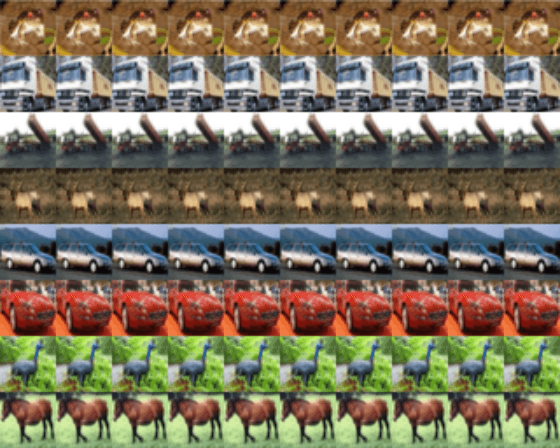
To illustrate the different augmentation techniques we need some demo data. CIFAR10 is available through Tensorflow so that is an easy start. For illustration purposes I take the first 8 examples of CIFAR10 and build a dataset with this. In real world scenarios this would be replaced by your own data loading logic.
import tensorflow as tf
tf.enable_eager_execution()

(x_train, y_train), (x_test, y_test) = tf.keras.datasets.cifar10.load_data()
dataset = tf.data.Dataset.from_tensor_slices((x_train[0:8] / 255).astype(np.float32))
With a simple function we can plot images from this dataset:
import numpy as np
import matplotlib.pyplot as plt

def plot_images(dataset, n_images, samples_per_image):
    output = np.zeros((32 * n_images, 32 * samples_per_image, 3))

    row = 0
    for images in dataset.repeat(samples_per_image).batch(n_images):
        output[:, row*32:(row+1)*32] = np.vstack(images.numpy())
        row += 1

    plt.figure()
    plt.imshow(output)
plt.show()Implementing augmentations
To augment the dataset it can beneficial to make augmenter functions: a function that receives an image (a tf.Tensor) and returns a new augmented image. By defining functions for each augmentation operation we can easily attach them to datasets and control when they are evaluated. The augmenter functions I use are based on the following signature:
def augment(x: tf.Tensor) -> tf.Tensor:
    """Some augmentation

    Args:
        x: Image

    Returns:
        Augmented image
    """
    x = .... # augmentation here
    return x
With this basic recipe for an augmenter function we can implement the augmenters itself. Here I will show examples of:
- Orientation (flipping and rotation)
- Color augmentations (hue, saturation, brightness, contrast)
- Zooming
Not all of these augmentations are necessarily applicable to CIFAR10; e.g. learning to detect flipped trucks is maybe not that beneficial for the task at hand. Nevertheless, I show them here as an example as they can be useful for tasks that are more orientation invariant. Of course, there are many more augmentations that could be useful, but most of them follow the same approach.
Rotation and flipping
One of the most simplest augmentations is rotating the image 90 degrees. For this we can use the rot90 function of Tensorflow. To get a new random rotation for each image we need to use a random function from Tensorflow itself. Random functions from Tensorflow are evaluated for every input, functions from numpy or basic python only once which would result in a static augmentation.
def rotate(x: tf.Tensor) -> tf.Tensor:
    """Rotation augmentation

    Args:
        x: Image

    Returns:
        Augmented image
    """

    # Rotate 0, 90, 180, 270 degrees
    return tf.image.rot90(x, tf.random_uniform(shape=[], minval=0, maxval=4, dtype=tf.int32))
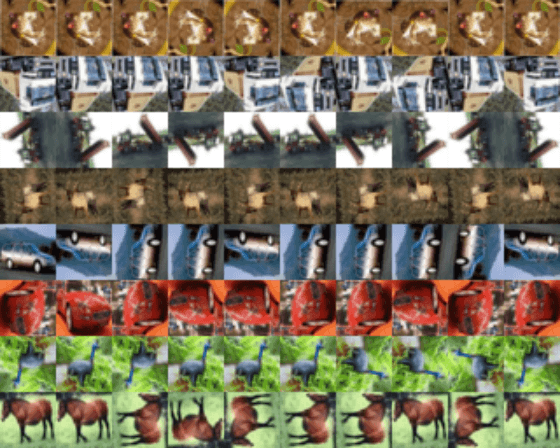
Flipping is another easy-to-implement augmentation. For these augmentations we do not have to use a random number generator as Tensorflow has a built-in function that does this for us: random_flip_left_right and random_flip_up_down.
def flip(x: tf.Tensor) -> tf.Tensor:
    """Flip augmentation

    Args:
        x: Image to flip

    Returns:
        Augmented image
    """
    x = tf.image.random_flip_left_right(x)
    x = tf.image.random_flip_up_down(x)

    return x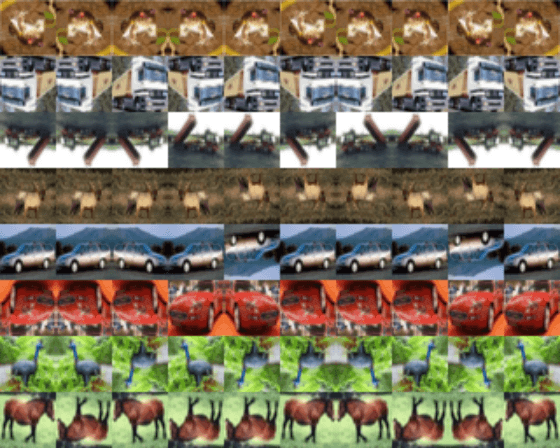
Color augmentations
Color augmentations are applicable to almost every image learning task. In Tensorflow there are four color augmentations readily available: hue, saturation, brightness and contrast. These functions only require a range and will result in an unique augmentation for each image.
def color(x: tf.Tensor) -> tf.Tensor:
    """Color augmentation

    Args:
        x: Image

    Returns:
        Augmented image
    """
    x = tf.image.random_hue(x, 0.08)
    x = tf.image.random_saturation(x, 0.6, 1.6)
    x = tf.image.random_brightness(x, 0.05)
    x = tf.image.random_contrast(x, 0.7, 1.3)
    return x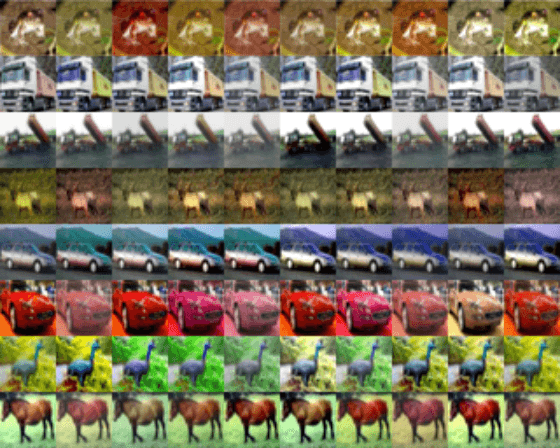
Zooming
Zooming is a powerful augmentation that can make a network robust to (small) changes in object size. This augmentation is a bit harder to implement as there is no single function that performs this operation completely. The Tensorflow function crop_and_resize function comes close as it can crop an image and then resize it to an arbitrary size. The function requires a list of ‘crop boxes’ that contain normalized coordinates (between 0 and 1) for cropping.
In the augmentation function below we first create 20 crop boxes using numpy. These boxes are created once and then passed on to the crop_and_resize function. This function returns a new image for each crop box, resulting in 20 potential cropped images for each input image. By using tf.random_uniform we can randomly select one of these crops. tf.random_uniform will give new random numbers during training so is safe to use here.
To make sure that some part of our data retains it original dimension, a tf.cond call can be used. tf.cond expects three parameters: a predicate (or condition), a true function true_fn and a false function false_fn. The predicate should be an operation that evaluates to true or false, after which true_fn or false_fn is called respectively. In our case we use a random number generator to return true in 50% of the calls. true_fn is set to the cropping function and false_fn to a identity function returning the original image.
Note: Do not use np.random functions for generating random numbers in these augmenter functions. These are only evaluated once in the TF data pipeline and will result in the same augmentation applied to all images.
def zoom(x: tf.Tensor) -> tf.Tensor:
    """Zoom augmentation

    Args:
        x: Image

    Returns:
        Augmented image
    """

    # Generate 20 crop settings, ranging from a 1% to 20% crop.
    scales = list(np.arange(0.8, 1.0, 0.01))
    boxes = np.zeros((len(scales), 4))

    for i, scale in enumerate(scales):
        x1 = y1 = 0.5 - (0.5 * scale)
        x2 = y2 = 0.5 + (0.5 * scale)
        boxes[i] = [x1, y1, x2, y2]

    def random_crop(img):
        # Create different crops for an image
        crops = tf.image.crop_and_resize([img], boxes=boxes, box_ind=np.zeros(len(scales)), crop_size=(32, 32))
        # Return a random crop
        return crops[tf.random_uniform(shape=[], minval=0, maxval=len(scales), dtype=tf.int32)]


    choice = tf.random_uniform(shape=[], minval=0., maxval=1., dtype=tf.float32)

    # Only apply cropping 50% of the time
    return tf.cond(choice < 0.5, lambda: x, lambda: random_crop(x))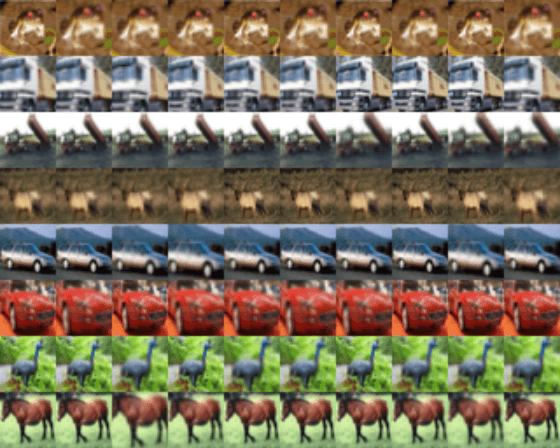
Augmenting the Dataset
With all functions defined we can combine them in to a single pipeline. Applying these functions to a Tensorflow Dataset is very easy using the map function. The map function takes a function and returns a new and augmented dataset. When this new dataset is evaluated, the data operations defined in the function will be applied to all elements in the set. Chaining map functions makes it very easy to iteratively add new data mapping operations, like augmentations.
To drastically increase the speed of these operations we can execute them in parallel, practically all Tensorflow operations support this. With the tf.Data API this is done using the num_parallel_calls parameter of the map function. When this parameter is higher than one functions will be executed in parallel. It is advised to set this parameter to the number of CPUs available.
Note: Some of these operations can result in images that have values outside the normal range of [0, 1]. To make sure that these ranges are not exceeded a clipping function such as tf.clip_by_value is recommended.
# Add augmentations
augmentations = [flip, color, zoom, rotate]

# Add the augmentations to the dataset
for f in augmentations:
    # Apply the augmentation, run 4 jobs in parallel.
    dataset = dataset.map(f, num_parallel_calls=4)

# Make sure that the values are still in [0, 1]
dataset = dataset.map(lambda x: tf.clip_by_value(x, 0, 1), num_parallel_calls=4)

plot_images(dataset, n_images=10, samples_per_image=15)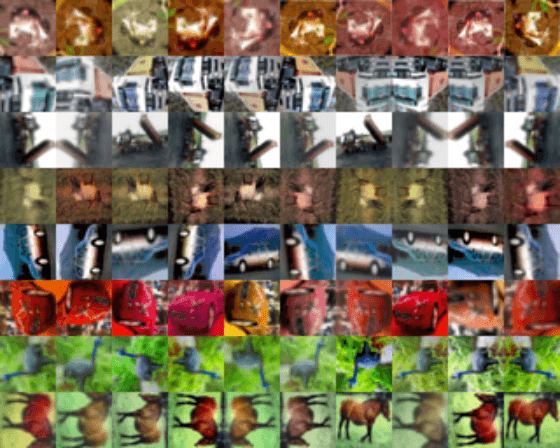
If applying all augmentations is a bit to much — which it is in the example above — it is also possible to only apply them to a certain percentage of the data. For this we can use the same approach as for the zooming augmentation: a combination of a tf.cond and tf.random_uniform call.
for f in augmentations:
    # Apply an augmentation only in 25% of the cases.
    dataset = dataset.map(lambda x: tf.cond(tf.random_uniform([], 0, 1) > 0.75, lambda: f(x), lambda: x), num_parallel_calls=4)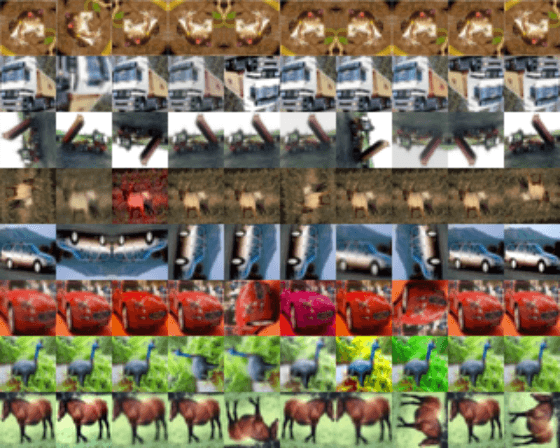
That’s it! Adding more augmentations is as simple as writing a new function and adding them to the list of augmenters. Any other tips for data augmentation using the tf.Data pipeline? Let me know!
Full code example used in this post
For convenience, all code in this post is repeated below, combined as a single script:
import tensorflow as tf

import numpy as np
import matplotlib.pyplot as plt

def plot_images(dataset, n_images, samples_per_image):
    output = np.zeros((32 * n_images, 32 * samples_per_image, 3))

    row = 0
    for images in dataset.repeat(samples_per_image).batch(n_images):
        output[:, row*32:(row+1)*32] = np.vstack(images.numpy())
        row += 1

    plt.figure()
    plt.imshow(output)
    plt.show()

def flip(x: tf.Tensor) -> tf.Tensor:
    """Flip augmentation

    Args:
        x: Image to flip

    Returns:
        Augmented image
    """
    x = tf.image.random_flip_left_right(x)
    x = tf.image.random_flip_up_down(x)

    return x

def color(x: tf.Tensor) -> tf.Tensor:
    """Color augmentation

    Args:
        x: Image

    Returns:
        Augmented image
    """
    x = tf.image.random_hue(x, 0.08)
    x = tf.image.random_saturation(x, 0.6, 1.6)
    x = tf.image.random_brightness(x, 0.05)
    x = tf.image.random_contrast(x, 0.7, 1.3)
    return x

def rotate(x: tf.Tensor) -> tf.Tensor:
    """Rotation augmentation

    Args:
        x: Image

    Returns:
        Augmented image
    """

    return tf.image.rot90(x, tf.random_uniform(shape=[], minval=0, maxval=4, dtype=tf.int32))

def zoom(x: tf.Tensor) -> tf.Tensor:
    """Zoom augmentation

    Args:
        x: Image

    Returns:
        Augmented image
    """

    # Generate 20 crop settings, ranging from a 1% to 20% crop.
    scales = list(np.arange(0.8, 1.0, 0.01))
    boxes = np.zeros((len(scales), 4))

    for i, scale in enumerate(scales):
        x1 = y1 = 0.5 - (0.5 * scale)
        x2 = y2 = 0.5 + (0.5 * scale)
        boxes[i] = [x1, y1, x2, y2]

    def random_crop(img):
        # Create different crops for an image
        crops = tf.image.crop_and_resize([img], boxes=boxes, box_ind=np.zeros(len(scales)), crop_size=(32, 32))
        # Return a random crop
        return crops[tf.random_uniform(shape=[], minval=0, maxval=len(scales), dtype=tf.int32)]


    choice = tf.random_uniform(shape=[], minval=0., maxval=1., dtype=tf.float32)

    # Only apply cropping 50% of the time
    return tf.cond(choice < 0.5, lambda: x, lambda: random_crop(x))

(x_train, y_train), (x_test, y_test) = tf.keras.datasets.cifar10.load_data()

data = (x_train[0:8] / 255).astype(np.float32)
dataset = tf.data.Dataset.from_tensor_slices(data)

# Add augmentations
augmentations = [flip, color, zoom, rotate]

for f in augmentations:
    dataset = dataset.map(lambda x: tf.cond(tf.random_uniform([], 0, 1) > 0.75, lambda: f(x), lambda: x), num_parallel_calls=4)
dataset = dataset.map(lambda x: tf.clip_by_value(x, 0, 1))

plot_images(dataset, n_images=8, samples_per_image=10)
35 comments
Archived from the years this post accepted comments, 2019 to 2021. Commenting is closed; for questions or remarks, use the contact page.
_faizan_
How do I use this augment strategy with tf.keras ? tf.keras allows to use datasets as given here: https://www.tensorflow.org/...
But the issue is that once you augment you get one new dataset. So I need to train loop myself and train. Instead I am asking how to do something like Keras ImageDataGenerator thing.

Wouter Bulten
As shown in the example on the TF website, you can inject the dataset. Something like:
dataset = (code from above)
dataset = dataset.batch(28)

model.fit(train_dataset, epochs=3)
Sam
Wouter Bulten
samra irshad
Hi Wouter, thanks for writing this article. I have been using tensorflow data generators and I have switched to dataset APIs due to their fast processing. However, I noticed a difference in performance between the models generated using generators and dataset API. I am trying to ensure the data augmentation I am applying in both the generators and dataset APIs is similar and I have a question relate to that: In tf.keras.preprocessing.image.ImageDataGenerator, the augmentations are applied randomly, like sometimes they are applied on images and sometimes they are not. I am wondering if the operations like tf.image.random_flip_left_right and tf.random_rotation offer the same behavior (augment the image with some probability) or do they always augment all the images?
Wouter Bulten
Hi Samra, yes they offer the same behaviour. For example, with the flip function there is a 50% chance that the image is passed on as-is without flipping.
Bruno Jerkovic
Wouter Bulten
Olga F
Hi Wouter, thanks for the article. As far as I understand, data augmentation does not change the number of samples in the dataset. The image transformations are applied to the original image, which is substituted by the augmented versions. But, in some cases where we are encountering class imbalance, our goal is to extend the existent dataset with new samples.
Wouter Bulten
Hi Olaf, yes that is true. Though, you can sample as often from the dataset as you want. Every time you sample will generate new images.
Anirudh
Wouter Bulten
Mubin Tirsaiwala
Wouter Bulten
Reza Bojnordi
Wouter Bulten
Ingrid Xu
Wouter Bulten
Ingrid Xu
Alexander P
Wouter Bulten
Tolga Dincer
Wouter Bulten
Pedro Galvez
Wouter Bulten
Kleyson Rios
Wouter Bulten
Shaobo
Wouter Bulten
Seni
Wouter Bulten
Kaushik Acharya
Typo: dataset.map(lambda x: tf.cond(tf.random_uniform([], 0, 1) > 0.75, lambda: f(x), lambda: x), num_parallel_calls=4))
There seems to be an extra end parentheses in the end.
Wouter Bulten
Good find, thanks! I've updated the article.
Germinate
Could someone explain what this function does?
I get the error of TypeError: <lambda>() takes 1 positional argument but 2 were given. I am not sure which lambda is throwing this error.
Wouter Bulten
Hi! Do u you have a bit more information on that error? Maybe stacktrace?