Automatically turn on tv when streaming to a Chromecast
I’m all in favor of “dumb” TVs combined with a Chromecast or Apple TV. I used to have a smart button that could toggle a smart switch to turn on my TV, which helped reduce standby mode when we weren’t using it. However, pressing the switch was an extra step that I often found inconvenient. That’s why I recently implemented a simple automation that turns on the TV automatically. Now, I can’t imagine why I didn’t set this up sooner - it’s so easy and convenient. In general, it’s a good lesson that sometimes the most simple automation can have the most practical impact.
(Hardware) requirements
- HomeAssistant with NodeRED
- A media player connected to the TV and configured in HA. I use a Chromecast.
- A smart switch that controls power to the TV (e.g., a Innr smart plug).
Flow
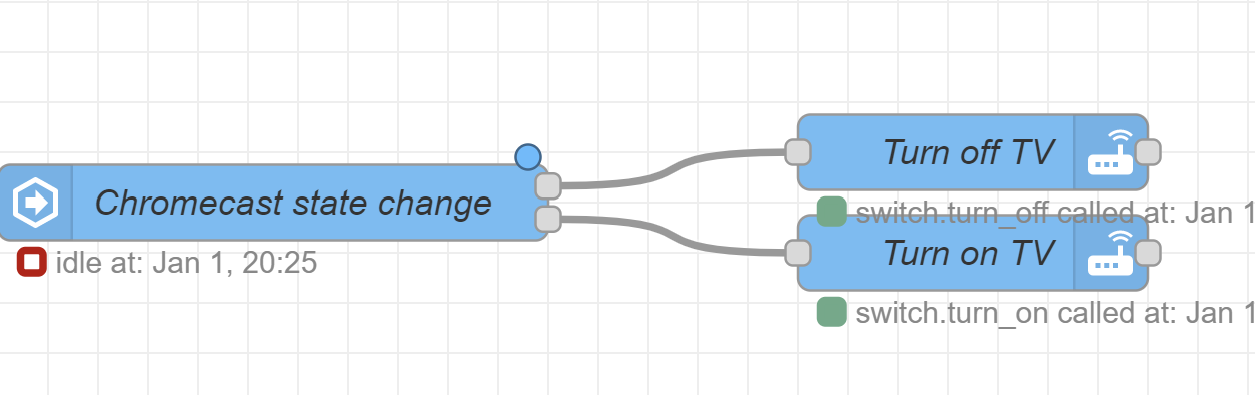
The flow is effortless. When you connect to a Chromecast from a device (e.g., a smartphone), the state of the media player in HA goes from off to idle. I use that state change to turn on the TV. Usually, when the Chromecast has started the streaming service, the TV also completes its startup routine.
To turn off the TV, I do the reverse. If the state goes to off for 5 seconds, I turn off the smart switch. The five-second delay is used to disable the automation when switching from streaming services. E.g., if you switch from Netflix to Youtube on your Chromecast, it briefly goes to off. Including a 5-second delay fixes that.
Source code
You can import the flow directly in NodeRED using the following snippet:
[{"id":"12a49465495b3126","type":"server-state-changed","z":"a53c777be3d20af7","name":"TV Control state change","server":"","version":4,"exposeToHomeAssistant":false,"haConfig":[{"property":"name","value":""},{"property":"icon","value":""}],"entityidfilter":"media_player.living_room_tv","entityidfiltertype":"exact","outputinitially":true,"state_type":"str","haltifstate":"off","halt_if_type":"str","halt_if_compare":"is","outputs":2,"output_only_on_state_change":true,"for":"5","forType":"num","forUnits":"seconds","ignorePrevStateNull":false,"ignorePrevStateUnknown":false,"ignorePrevStateUnavailable":false,"ignoreCurrentStateUnknown":false,"ignoreCurrentStateUnavailable":false,"outputProperties":[{"property":"payload","propertyType":"msg","value":"","valueType":"entityState"},{"property":"data","propertyType":"msg","value":"","valueType":"eventData"},{"property":"topic","propertyType":"msg","value":"","valueType":"triggerId"}],"x":150,"y":220,"wires":[["20e6ab7719a86154"],["095a728742e847df"]]},{"id":"095a728742e847df","type":"api-call-service","z":"a53c777be3d20af7","name":"Turn on TV","server":"","version":5,"debugenabled":false,"domain":"switch","service":"turn_on","areaId":[],"deviceId":["f3bb9df57ab620c668166b9c5eabb1f2"],"entityId":[],"data":"","dataType":"jsonata","mergeContext":"","mustacheAltTags":false,"outputProperties":[],"queue":"none","x":430,"y":240,"wires":[[]]},{"id":"20e6ab7719a86154","type":"api-call-service","z":"a53c777be3d20af7","name":"Turn off TV","server":"","version":5,"debugenabled":false,"domain":"switch","service":"turn_off","areaId":[],"deviceId":["f3bb9df57ab620c668166b9c5eabb1f2"],"entityId":[],"data":"","dataType":"jsonata","mergeContext":"","mustacheAltTags":false,"outputProperties":[],"queue":"none","x":430,"y":200,"wires":[[]]}]Feedback? Questions?
Do you have a question or comment about this post? Feel free to reach out to me via the contact page.